Web Apps Redefined
Desktop-class applications in the browser. No downloads. No plug-ins. Nothing to install.
What's under the hood.
The architecture that makes desktop-class applications possible in a browser.
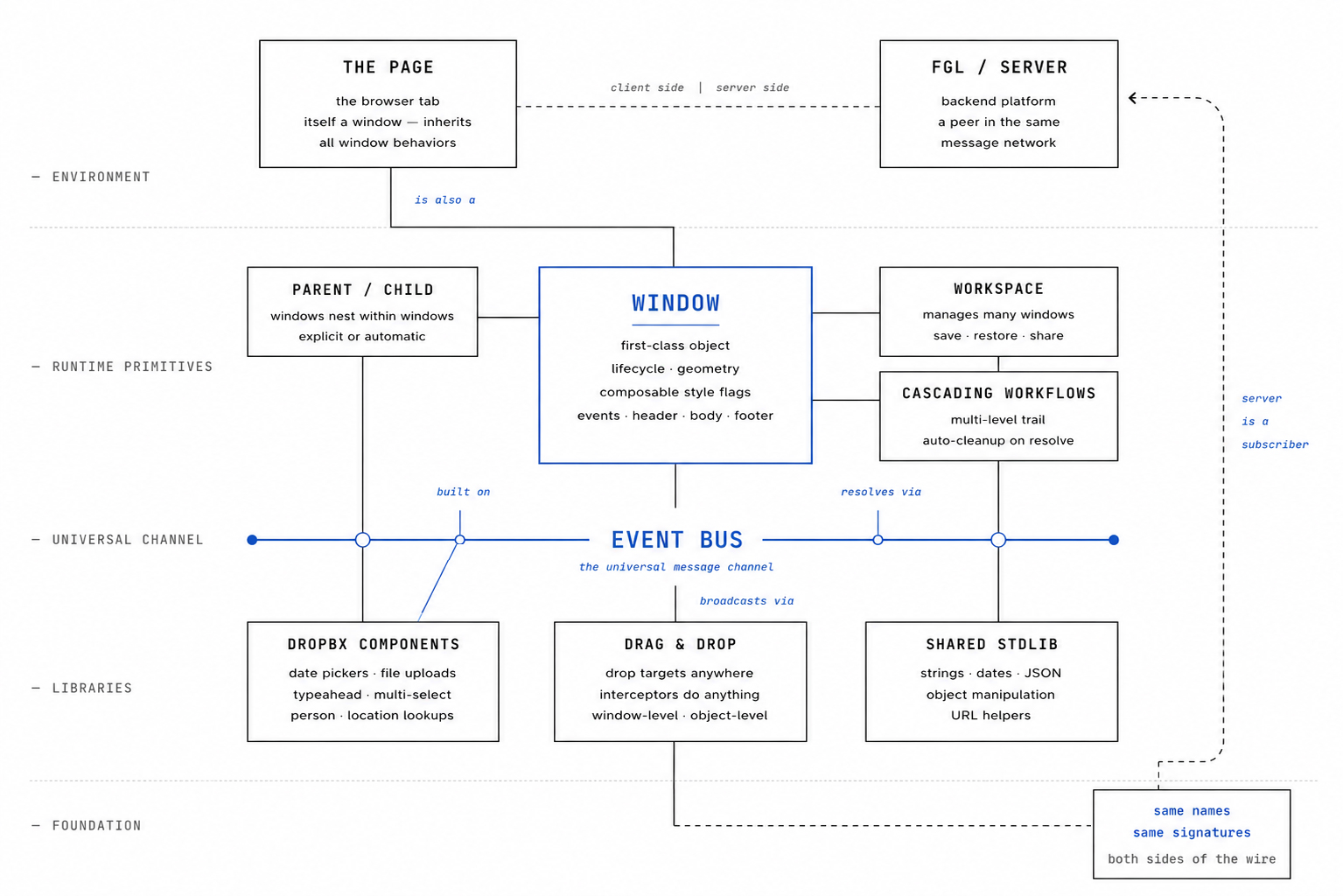
xWinLib is not a UI kit, a framework wrapper, or a collection of helpers. It is a complete application runtime built from core subsystems — each one independently strong, each one composable with the others, each one engineered to do work the browser platform does not do on its own.
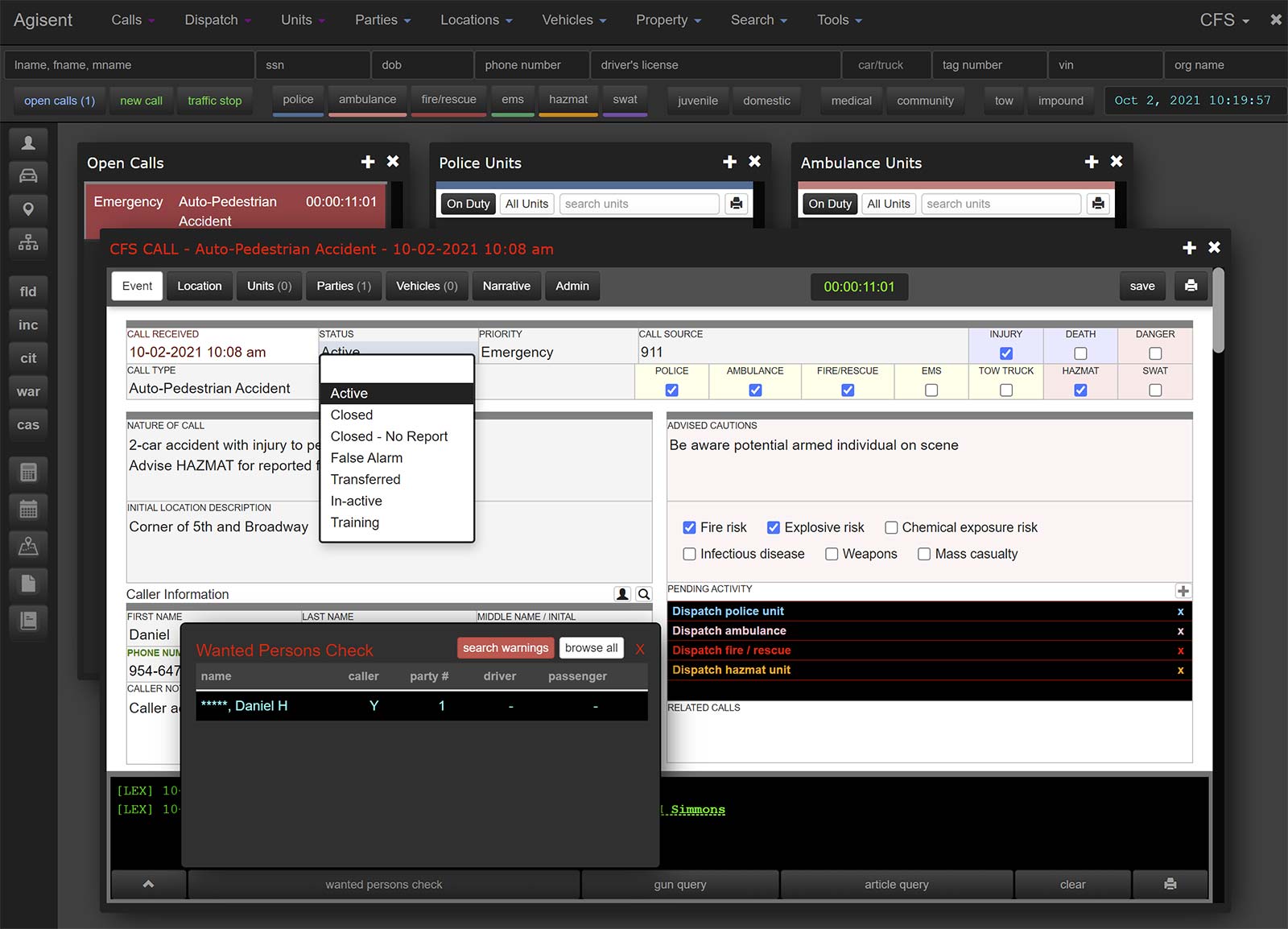
Every window is a first-class object with its own lifecycle, geometry, header, body, footer, and event handlers — fully configurable. Extensive composable style flags govern behavior and appearance — header, footer, border, drag, drop, modal, transparent, magnetic snap, always-on-top, undockable, system menu, context menu — mixed independently into each window's style.
Built-in operations cover everything desktop software has trained users to expect: maximize, minimize, roll up, center, animate in, fade out, restore to last position. Spatial queries answer "which window is the user pointing at" without the application tracking it.
The window isn't a styled div with manual event wiring. It is a primitive with the same depth as window on the desktop.
The page itself is a window. It inherits the same behaviors individual windows have — drag and drop, send and receive messages, dynamic updates. Every other window is a child of it by default, and windows can have other windows or objects as parents, set programmatically or assigned automatically.
Maximize a window, then open another while the first is maximized, and the new window automatically becomes a child of the maximized one — size and position kept relative to the parent. Unmax or minimize the parent, and the children maintain their geometry inside it.
Hierarchy isn't a layout convenience. It's a coherent model that lets complex multi-window UIs behave the way users already expect from desktop software, without the application tracking the relationships by hand.
Real applications nest workflows. A form needs a person; a person lookup opens a search; a search result opens a confirmation; the confirmation feeds the original field. Three or four windows deep is normal — and on a hand-rolled stack, each layer becomes the developer's problem to wire up, track, and tear down.
xWinLib tracks the trail automatically. When the user confirms at the deepest level, the result flows back to the originating field and every window opened along the way closes itself in sequence. No manual bookkeeping, no orphaned panels left behind. The application code expresses the workflow once; the runtime handles the cascade.
Cascades respect the event bus and the parent/child hierarchy. A resolution can broadcast its result through the bus so anything else listening updates in lockstep. An abandoned cascade cleans up regardless of how deep it went. Multi-level workflows stop being a maintenance burden and become a natural way to structure complex software.
A page running xWinLib is a managed environment, not a loose collection of components. New windows auto-position in a cascade, or can be programmatically sized and positioned as desired. The workspace can be organized by type — tile, cascade, group, custom. Modal windows capture focus correctly. Magnetic windows snap to their siblings. The desktop itself is a participant in the system, not just a background.
Every window's full state — position, size, z-order, scroll offset, parent/child relationships, content reference, custom properties — serializes to a single string and rehydrates on demand. Save, restore, and share become the same operation.
Imagine deep-diving a law enforcement case: multiple windows for the matter, narratives, parties, evidence, each sized and positioned specifically, each related to the others, z-orders arranged the way the investigator works. Save it. That entire working session is now a portable artifact — restore it tomorrow exactly as you left it, or share it to a colleague who picks up the same windows in the same arrangement on their own desktop. One click to restore, or drag the serialized string onto any xWinLib-enabled page.
A workflow becomes a thing you can keep, return to, or hand off. Multi-user investigation, collaborative analysis, end-of-day-resume-tomorrow — all the same primitive, no extra plumbing.
Windows don't communicate by holding references to each other. They publish messages on a shared event bus, and any subscriber — another window, the desktop, the server, an arbitrary handler — receives them.
Subscriptions register against the publisher's lifetime and auto-clean when the publisher destroys. The entire class of stale-listener bugs that plague hand-rolled event systems simply disappears.
Reserved channels route to parent frames, base frames, and modal contexts. OpenAjax Hub integration is built in for standards-based interop. Event triggers fire on lifecycle moments, user actions, server pushes, or custom signals — anything an application defines as worth knowing about.
Drop targets aren't limited to windows. Any region — a window, the desktop, an individual element — can declare itself a drop target. Dropped data routes through interceptors that can do anything the application defines: parse, validate, transform, or assemble.
A working example: drop an image on the desktop and a handler can parse the metadata, look up the matching user record, assemble a profile window with the data and the image, then broadcast through the event bus so every interested listener updates in lockstep. One drop, one cascade, no glue code.
Cross-iframe drag is supported. Three independent routes — window-level, background-level, arbitrary-object-level — let drop semantics be tuned per surface.
xWinLib ships with DropBX, a complete UI component layer built on the windowing core: date pickers, date ranges, file uploads, typeahead dropdowns, multi-select widgets, list editors, modal selection windows, and dynamic field binding.
Domain-aware lookups for people, locations, and reference data hand back structured records rather than strings. Every component is event-bus-aware: a date picker change in one window can broadcast through the bus and update three other windows automatically, with no glue code.
The components aren't isolated widgets grafted onto the page. They're nodes on the same network as everything else.
Many of xWinLib's utility functions — strings, dates, JSON, object manipulation, URL helpers — exist on the server in FGL with the same names, the same parameters, and the same behavior.
A developer writes dateFormat(d, "mm/dd/yyyy") and gets the same output whether the code runs in the browser or on the server. nameCap, strat, keytodate, objToJSON — same call, same result, both sides of the wire.
Most stacks force the developer to hold two dictionaries with translation layers between them and the small bugs that come from "almost-the-same" implementations. xWinLib + FGL collapses that to one cognitive model.
How it connects.
The architectural overview.
xWinLib in production.
Real applications, real workflows, real users. Click any image to view full size.


In code.
Six examples across the runtime. Every line is real xWinLib — the same patterns running in production today.
// create a client-side window in the current page
var w = fgl_win( "/userProfile?userid=<[ ! ouser.userid ]>", {
        dispMode : DISP_CENTERED,
        title    : 'User Profile'
    }
);

// get the window's document
var doc = w.getDocument();

// interact with content inside the window
doc.domSet( "msg", "Welcome to your window" );
doc.doInit();// create two windows
var w1 = fgl_win( "/win1.htm", { title: '1st window', width: 640, height: 450 } );
var w2 = fgl_win( "/win2.htm", { title: '2nd window', theme: 'light' } );
// register each window's interest in a message
wmsg.register( w1, "profile_pic_change", "cbFuncW1" );
wmsg.register( w2, "profile_pic_change", "cbFuncW2" );
// broadcast when the profile pic changes
imgProfile.onchange = function() {
wmsg.send( "profile_pic_change", { url: this.src } );
};// one-line async update of any DOM element
uiAjaxUpdate( domid, url, extra );
// domid = dom element (object or id) to update
// url = web url with params, POSTed asynchronously
// extra = JS string to execute when the POST returns
// example: refresh a card with fresh data
uiAjaxUpdate(
"matter_summary",
"/api/matter/refresh?id=2024-CR-0847",
"highlightChanges()"
);// register the desktop as a drop target for images
dropTarget( "desktop", {
accepts : "image/*",
handler : function( drop ) {
// parse metadata, look up the user, assemble the profile window
var meta = imgParseMetadata( drop.file );
var user = userLookup( meta.subject );
var w = fgl_win( "/userProfile?userid=" + user.id );
// broadcast — every interested listener updates
wmsg.send( "user_profile_opened", { user: user } );
}
} );// save the entire working session to a single string
var snapshot = workspace.serialize();
// includes position, size, z-order, scroll offsets,
// parent/child relationships, content references,
// and any custom properties on every window
// later — restore exactly as it was
workspace.restore( snapshot );
// or share it — colleague pastes the string,
// their workspace becomes a copy of yours
workspace.restoreFromString( pastedString );// browser code
var formatted = dateFormat( d, "mm/dd/yyyy" );
var capName = nameCap( "william hauter" );
var jsonStr = objToJSON( payload );
// server code (FGL)
var formatted = dateFormat( d, "mm/dd/yyyy" );
var capName = nameCap( "william hauter" );
var jsonStr = objToJSON( payload );
// same call, same result, both sides of the wire